
The creation of high-quality graphics can be a challenge for tight budgets and small creative teams. AI can accelerate concept development by using workflows. Scripts, roles, scenes, images, videos, text, and audio are all brought into one workflow with Pippit. Planning, prompting, reviewing, and refining are all necessary for professional results.
What Makes an AI-Generated Asset Feel Professional
Clarity, consistency, relevance, composition, and purpose are the foundation of professional quality. It takes more than pushing a button to generate an AI movie idea. All assets should align with the message, audience, platform, and visual identity. Aspect ratio, framing, pacing, and readability of text are also important factors for strong results. Appearance, setting, lighting, camera perspective, mood, and boundaries of style are well defined through clear prompts. Direction is purposeful, and this limits confusion and improves the quality of the media produced. Review is a must because there may be inconsistencies in the assets generated, awkward details, or inappropriate interpretations. Quality control is the key to making affordable production more effective.
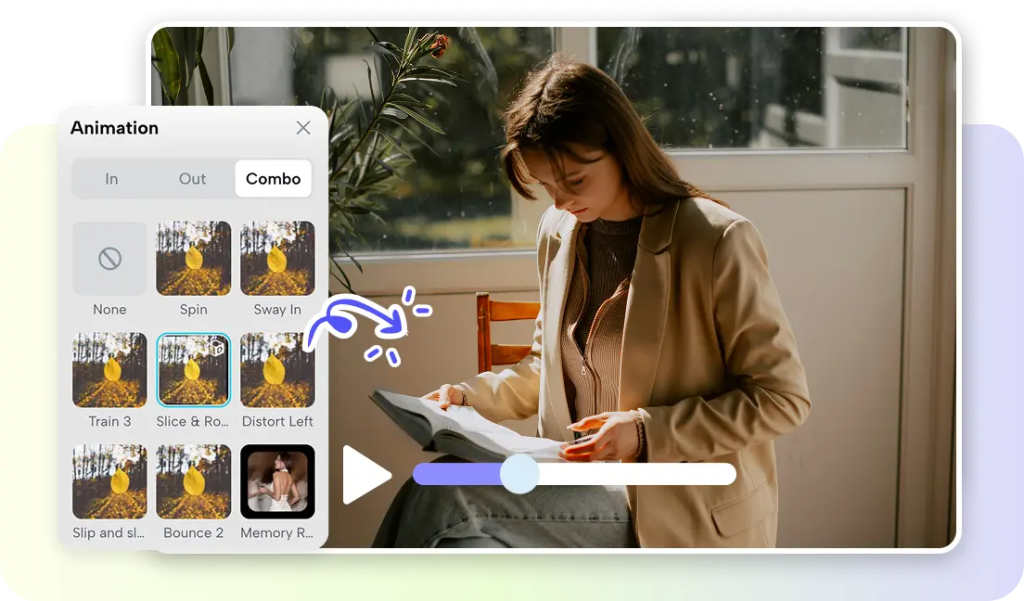
Plan the Asset Mix Before Spending Creative Resources
Identify all roles, scenes, images, videos, audio components, and text elements first. Pippit can collate assets related to a project on a single canvas for easier project planning. Determine what assets should be multiple iterations and what assets should be one good iteration. Deeper production can be identified in the early drafts. It saves you from any unnecessary generations and saves resources for important scenes. Product campaigns can require several hooks and fewer variations. Narrative projects can involve characters, settings, transitions, and scene references. Generation is more efficient and easier to review with planning relationships. The objective is to test direction prior to detailed production.
Use Prompt Detail to Get More Intentional Results
The story studio process is more effective if prompts give detailed creative direction. Explain how a character looks, what clothes they wear, the expression on their face, the pose, the setting, the lighting, the camera angle, and the visual style. Include voice tone, pacing, product context, or emotional mood if it impacts results. A descriptive prompt tells them what to look for, and a purpose-driven prompt tells them why it is important. Ask for a strong speaker, next to a product, with clean studio lighting. Request mood and audience for greater alignment. Certain directions can help bring consistency to related characters, scenes, and promotional visuals. Read through the results, and edit vague instructions rather than brainstorm other options. This helps to focus creative decisions.
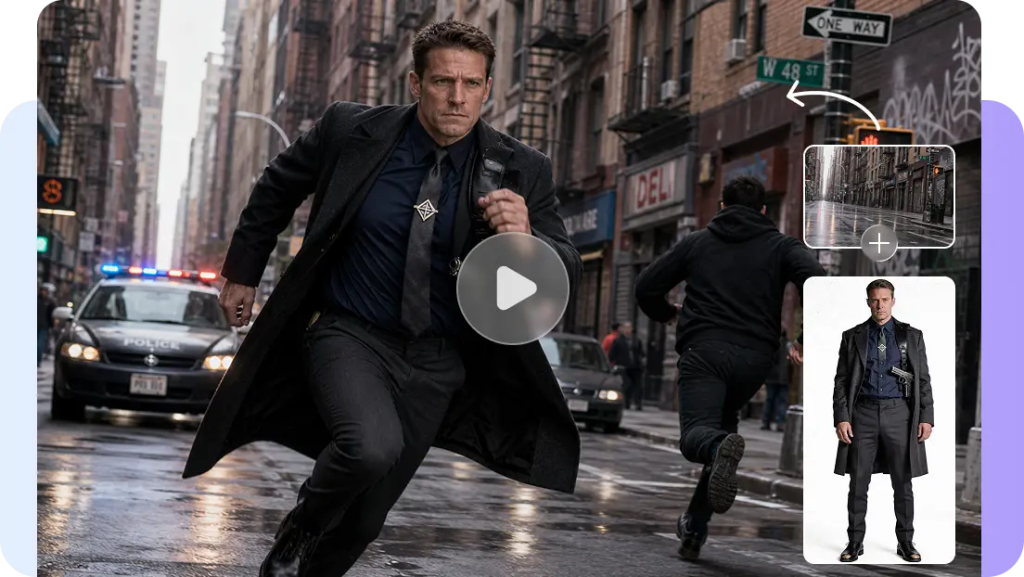
Steps to Generate Professional-Grade Assets on Any Budget with Story Studio
Step 1: Start your project with the tools you need
1 Sign up for Pippit using your Google, TikTok, or Facebook account information.
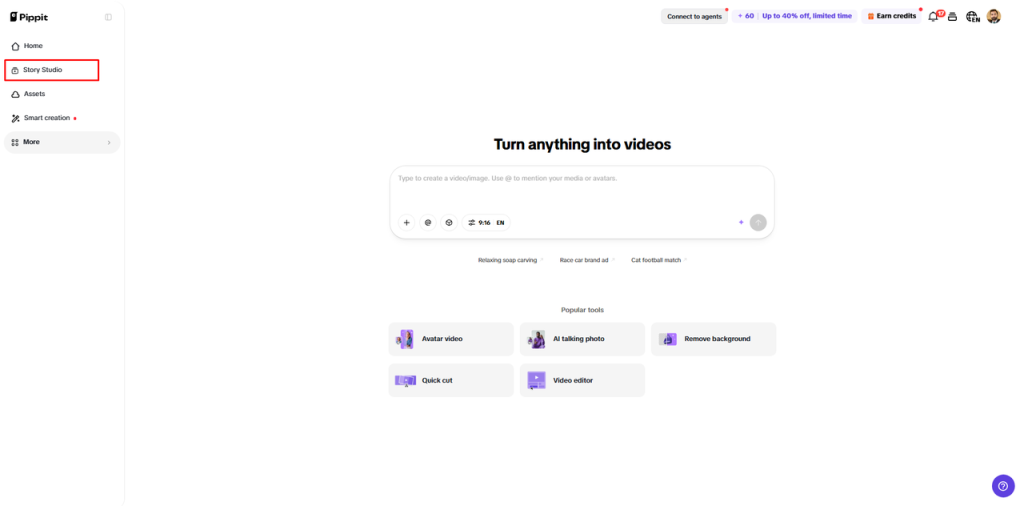
2 Click the “Story Studio” tab on the left vertical menu of the home page to enter Story Studio.
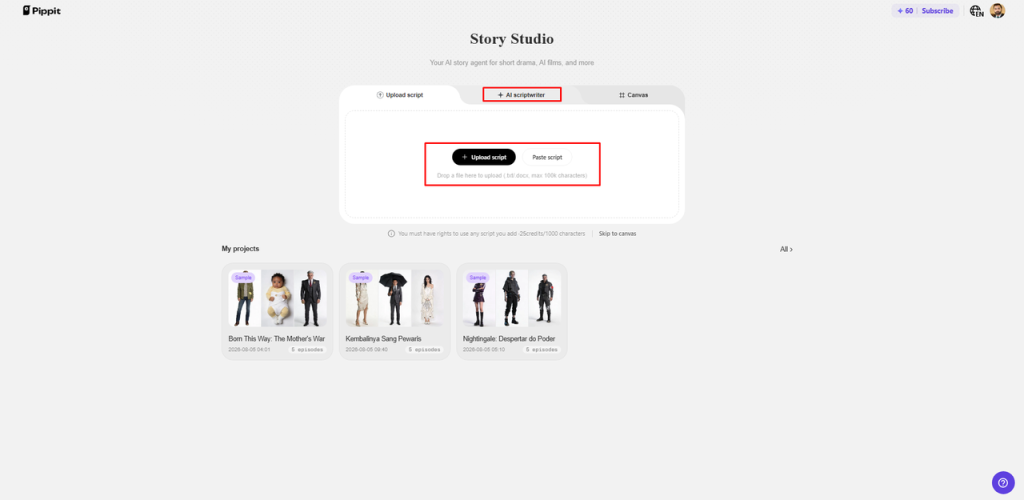
3 Upload your script through “Upload script” or write or paste it using the “Paste script” tab.
4 You can also use “AI scriptwriter” from the top menu to generate a script for your chosen video topic.
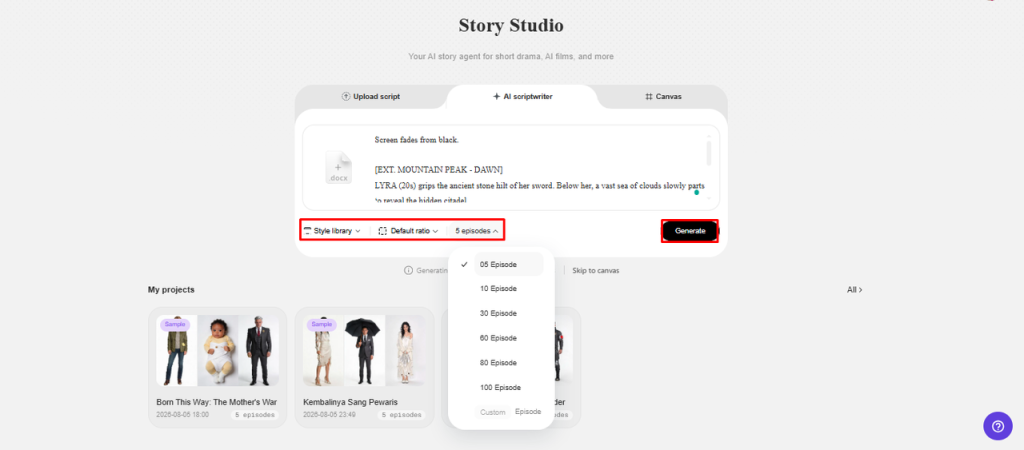
5 Open the “Style library” at the bottom left of the dialogue box and select a style that fits your project.
6 Click “Default ratio” to choose a custom aspect ratio. Then use “Episodes” to select the number of episodes you need.
7 Click “Generate” to let AI generate your script and prepare the project structure.
Step 2: Build quality assets efficiently
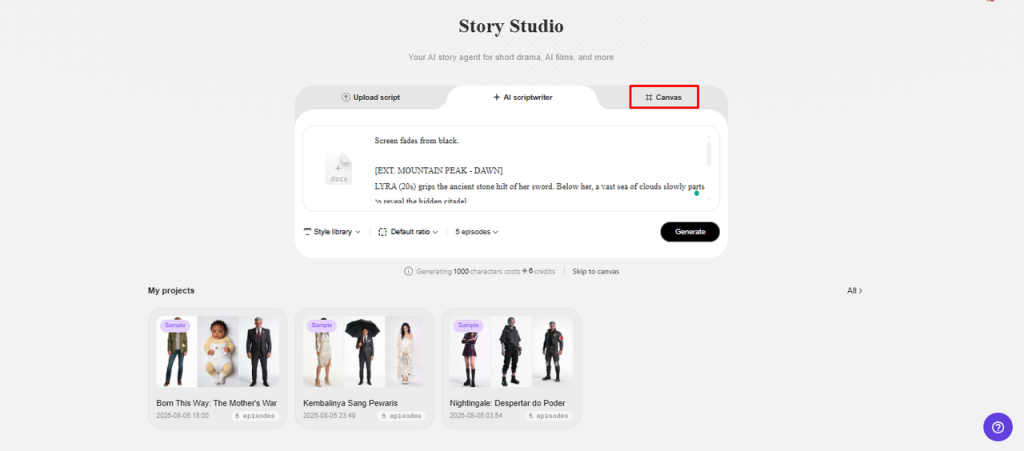
1 Use the “Canvas” tab to add images, scene videos, and audio. You can also identify characters and assign roles for greater control over your story video.
2 Write focused prompts for each part of the story. Include the character look, setting, lighting, camera angle, style, voice tone, story mood, and product context to guide the generated assets.
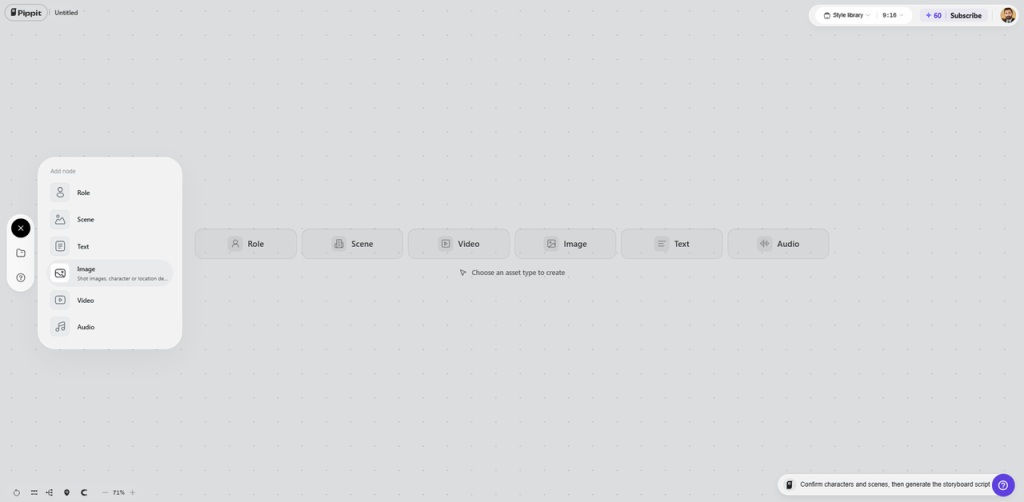
3Organize the characters, scenes, images, and audio in the same workspace to streamline the production process and reduce the need for separate tools.
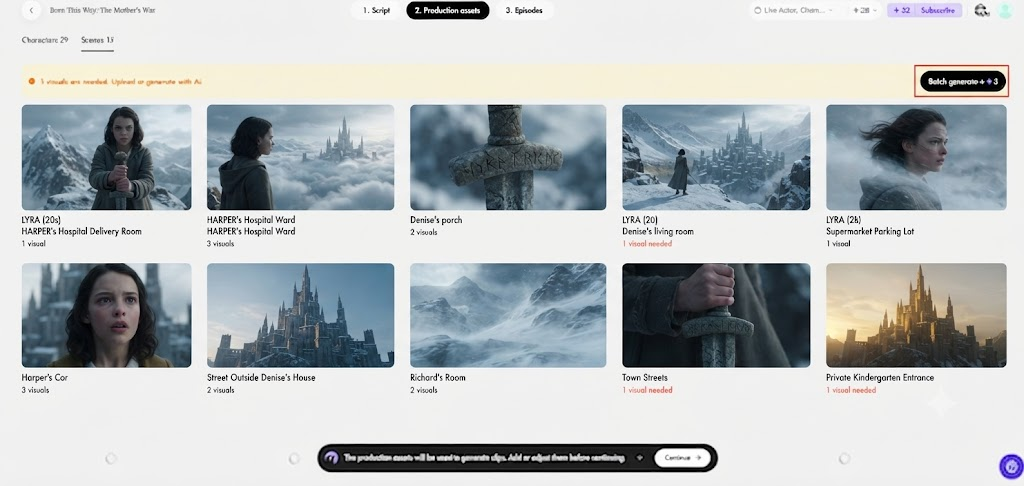
4 After assigning roles, generating characters, and creating scenes, click “Batch generate” to generate multiple episodes at once.
Step 3: Review, refine, and download your assets
1 Review the episodes in Story Studio and edit the characters, roles, scenes, audio, and other elements for further refinement.
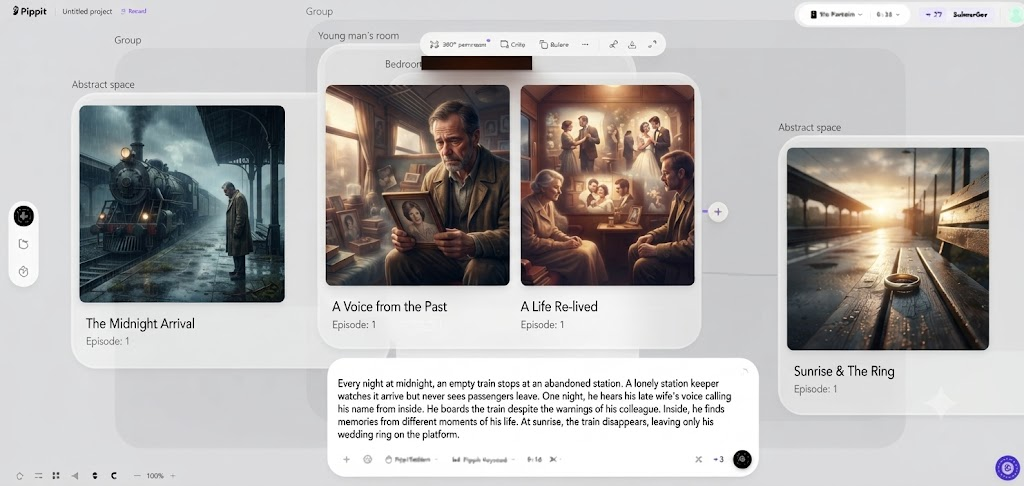
2 Make any final adjustments needed to improve the quality and consistency of the generated assets.
3 Once you are satisfied with the episodes, click “Select all” and then “Download” to bulk download the generated episodes to your device.
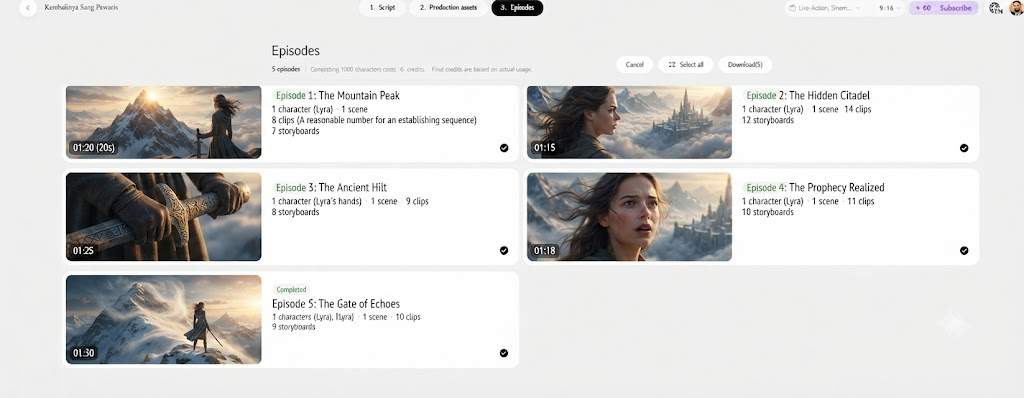
Stretch a Limited Budget Through Smarter Iteration
When every generation has a different creative question, efficiency increases in the budget. Try out story hooks, character looks, product contexts, and scene directions before going into detail variations. Video drafting can speed up comparison of concepts without spending time on all the alternatives. Seedance 2.0 Mini will be able to work with lower-cost video drafts under appropriate Pippit workflows. These drafts can be used to explore short drama scenes, product clips, social concepts, and visual pacing. Evaluate initial ideas and choose the best route before going into production. Projects should be prioritized, and credits should be awarded based on priorities, not on a random basis. An ad maker workflow can arrange final assets for campaigns.

Create Professional Visual Assets Without Traditional Production Complexity
Character references, concepts for film scenes, promotional images, and ideas for social videos can be generated with structured prompts. Pippit is used for product story, campaign visuals, narrative scenes, and presentation content. Lighting creates ambiance and camera angles guide focus and size. Visual hierarchy and important subjects are determined by composition and kept easy to understand. The styling should be the same for characters, products, locations, and repeat scenes. This continuity is important from campaign to campaign, episode to episode. Grouping similar media can make it easier to make changes and identify discrepancies sooner. Pippit integrates various asset types into a single workflow, eliminating the need to jump between different creative applications.
Scale From One Asset to Complete Episode Packages
One idea can grow into roles, scenes, pictures, videos, audio components, and additional text. Episode settings are used to divide bigger story projects into smaller work groups. When multiple episodes have similar structures, batch generation can speed up repeated creation. But don’t forget to review the assets created, as speed is not a substitute for this. Finished episodes can enter the editing, publishing, campaign, or presentation workflows. Bulk downloading is useful if you have a number of completed files that you want to transfer to another production environment. This architecture facilitates easier scaling without compromising relationships between characters, scenes, and media. Clear naming, review, and organization are helpful for larger projects.
Build a Quality-Control Loop Before Final Export
Always check all the generated parts before using them as production parts. Be sure to inspect these areas:
•Consistent character throughout images, scenes, poses, clothes and expressions.
•Spatial, lighting, action, viewpoint, and visual style continuity within scenes.
•Clearness of story in pictures, video, text and story elements.
•Mood, pacing, dialogue, action and audience context audio alignment.
•Improve variation quality by eliminating weak, repetitive, confusing, and unnecessary alternatives.
•Encourage clear communication by clarifying instructions when outcomes are not along the desired creative line.
Quality is safeguarded in any size budget with a disciplined review loop. It also helps to pinpoint issues that would be costly to fix later in the downstream editing process.
Conclusion
Professional-class output is not a matter of spend; it’s a matter of discipline. Create a plan for asset mix, relationships, and prompts with a specific creative intent. Organize roles, scenes, images, videos, text, and audio using Pippit’s canvas. Try out new ideas before spending a lot of money on production. Check each result, cut down on poor variations, and clarify unclear directions. Large projects can be completed faster with batch workflows and maintain organization. Bulk export can make transitioning into editing, publishing, or campaign workflows easy. Limited resources work harder, and consistent professional results are driven by strong creative direction.